
CASE STUDY
Work Planner
Giving Supervisors and Crews Their Morning Back
ROLE
Lead Product Designer
Team
Senior Project Manager
Two Principal Architects
Lead Senior Engineer
TIMEFRAME
2024-2026
ROLE
Lead Product Designer
Team
Two Principal Architects
TIMEFRAME
2024-2026
ROLE
Lead Product Designer
Team
Two Principal Architects
TIMEFRAME
2024-2026
ROLE
Lead Product Designer
TEAM
Senior Project Manager, Principal Architects
TIMEFRAME
2024-2026
ABOUT THE PROJECT
OpenGov’s Enterprise Asset Management suite helps 2,000+ public agencies run their infrastructure: roads, parks, utilities, fleets, facilities. Every morning a supervisor who has to decide who’s doing what, where, and with which equipment. In the legacy product (EAM Classic), the only tool for this was a bare “Task Calendar” that was extremely limited and difficult to use but despite that there were communities that relied on it. Because the task at hand is so painful, even a broken tool was helpful enough for them. We heard loud and clear this tool was needed to be brought over into the updated platform but we knew we would immediately fail if we just copied it 1:1. We decided to start over from scratch.
Work Planner is an AI-driven scheduling tool that auto-assigns field crews to their daily and weekly work and lays the plan out as a “whiteboard”. There’s a row for each person or major piece of equipment where the supervisor can view and tweak the schedule. It’s for planners and filed workers at agencies of every size and for every skill level.
PROBLEMS AND GOALS
- Everything at once: Who’s available (PTO, sick days, shifts, skills, who can run which equipment), what equipment is free, and what work is due (priorities, deadlines, locations, real durations).
- Tricky alignments: Who’s available (PTO, sick days, shifts, skills, who can run which equipment), what equipment is free, and what work is due (priorities, deadlines, locations, real durations).
- Unconnected tools: Plans lived on whiteboards and spreadsheets, or just verbal agreements, disconnected from the asset and work-order data in the EAM app.
- Weather and emergencies blow up the day: Much of the work has hard weather limits, paving and sealing need a temperature window, and rain stops a long list of jobs outright. When those happen, it’s a ton of redoing all the existing plans.
- Scale: A single work order could be 1 or 1,000+ tasks (valves, hydrants, inspections) that all defaulted to the same due date on creation and then had to be spread across days and crews by hand.
- Skill levels: The existing Task Calendar and GIS-grade tools were too complex or too thin for non-technical supervisors who just needed to plan the week or field workers that only wanted to see what to do next.
PROCESS
I ran a lot of interviews, fast. I ran an AI-assisted research loop with Marvin so I could interview several people, synthesize what I heard into personas, journey and empathy maps, turn that into a prototype, and bring it back for reaction in a fraction of the usual time, updating between almost each interview. I talked with agencies of every size and type and they tested the automation and interface as we built it in two week loops.
What I was looking for was not a list of requirements but an overall image of their problems and goals. The white boarding was common either literally or as a spreadsheet. Instead of teaching a new mental model, I met them where they were at with that familiar interface but with AI doing the heavy lifting underneath. Shortly after we started doing traditional Figma mockups and prototypes, we joined the Figma Make Alpha project. With Make I was suddenly able to build very robust interactive prototypes that the team and customers could click through every flow and feel it at scale. I pushed Make to the limit several times requiring direct intervention with Figma’s support team (they also said I was one of the most active users they had). When it came time, Engineering also built production from scratch with AI, because nothing off the shelf came close for us to mold into what we needed.
I had to design for every skill level simultaneously. Some of the supervisors I interviewed had years of GIS experience. Some of the field crews using the mobile view had limited English, limited reading ability, or both. Both had to succeed in the same system without separate training tracks. There was no time for training anyone either and even if there was, there was high-turnover in the field roles so everything had to be instantly intuitive.
Accessibility also wasn’t a design preference, it was a requirement. OpenGov’s public sector customers operate under accessibility standards that go beyond typical enterprise software, built for users with disabilities as well as users with no time or inclination to learn a new tool. I leaned into icon-first navigation over text-heavy menus, large touch targets, high contrast for outdoor visibility, and interactions that don’t depend on reading comprehension to complete.

A company-wide demo I made of Work Planner and the AI-driven design and build process behind it.
EARLY IDEATION
An early Figma prototype, before the move to Make. I was working out how to show crews, equipment, tasks, and time all at once.
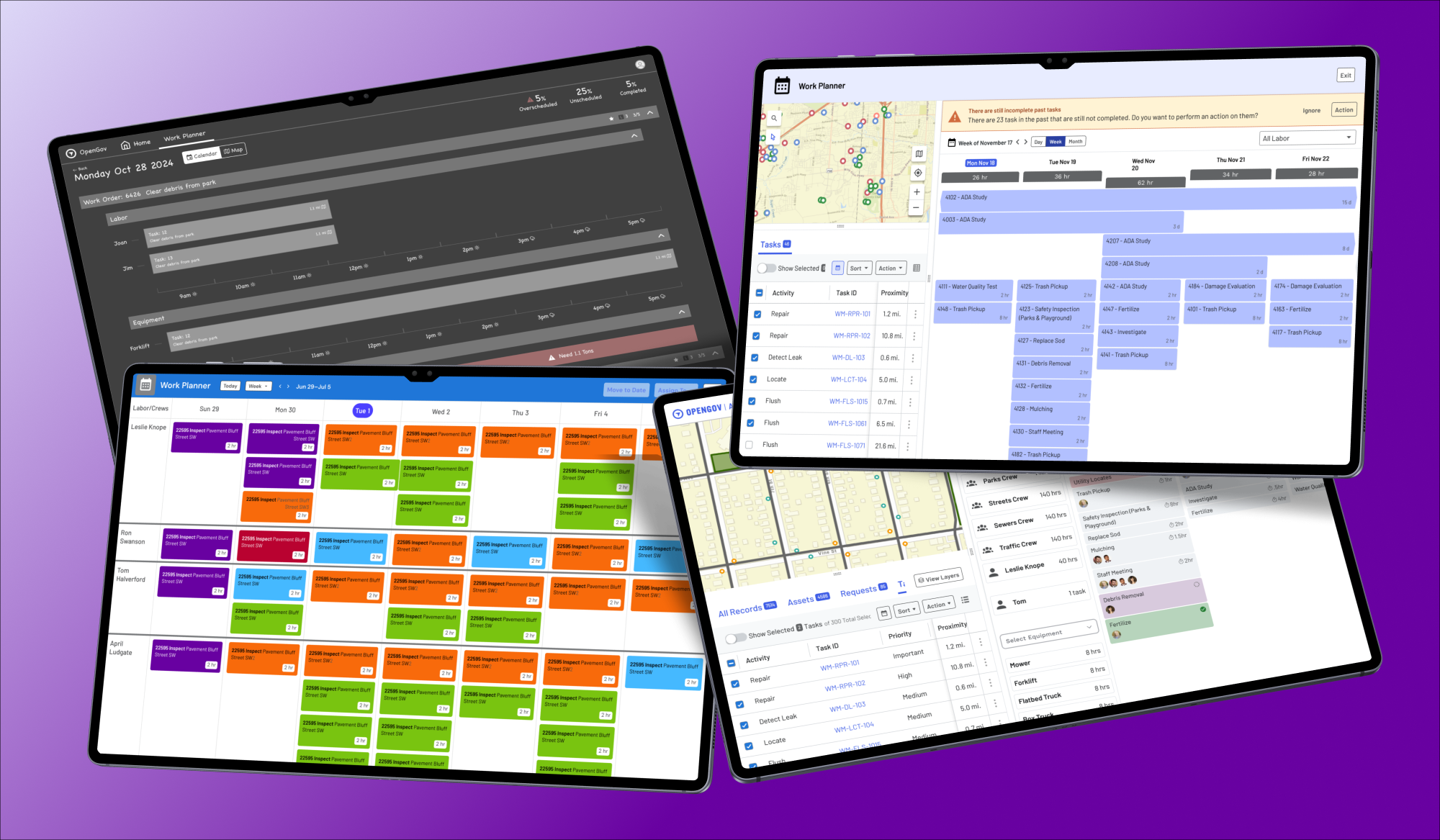
I explored several ways to show crews, equipment, tasks, and time together, from calendar to grid to labor view, before converging on the whiteboard. Users wanted bold signals they could understand at a glance.
SOLUTION
The temptation in enterprise software is to teach people a better system. Instead, I met supervisors where they already work with the whiteboard they already trusted, and made it build itself while keeping the human in control. AI does the heavy lifting, the supervisor can still override and teach. The whiteboard was just the starting point though. Once supervisors were on familiar ground, I could give them what a physical board never could: bulk moves across hundreds of tasks at once, shift entire days forward when emergencies happen, live capacity and metrics, conflict alerts. The longer-term vision extends the same idea, shifting supervisors from “manage everything” to “manage by exception” where self-improving automation commits the routine plan and people only resolve the handful of cases that need judgment.
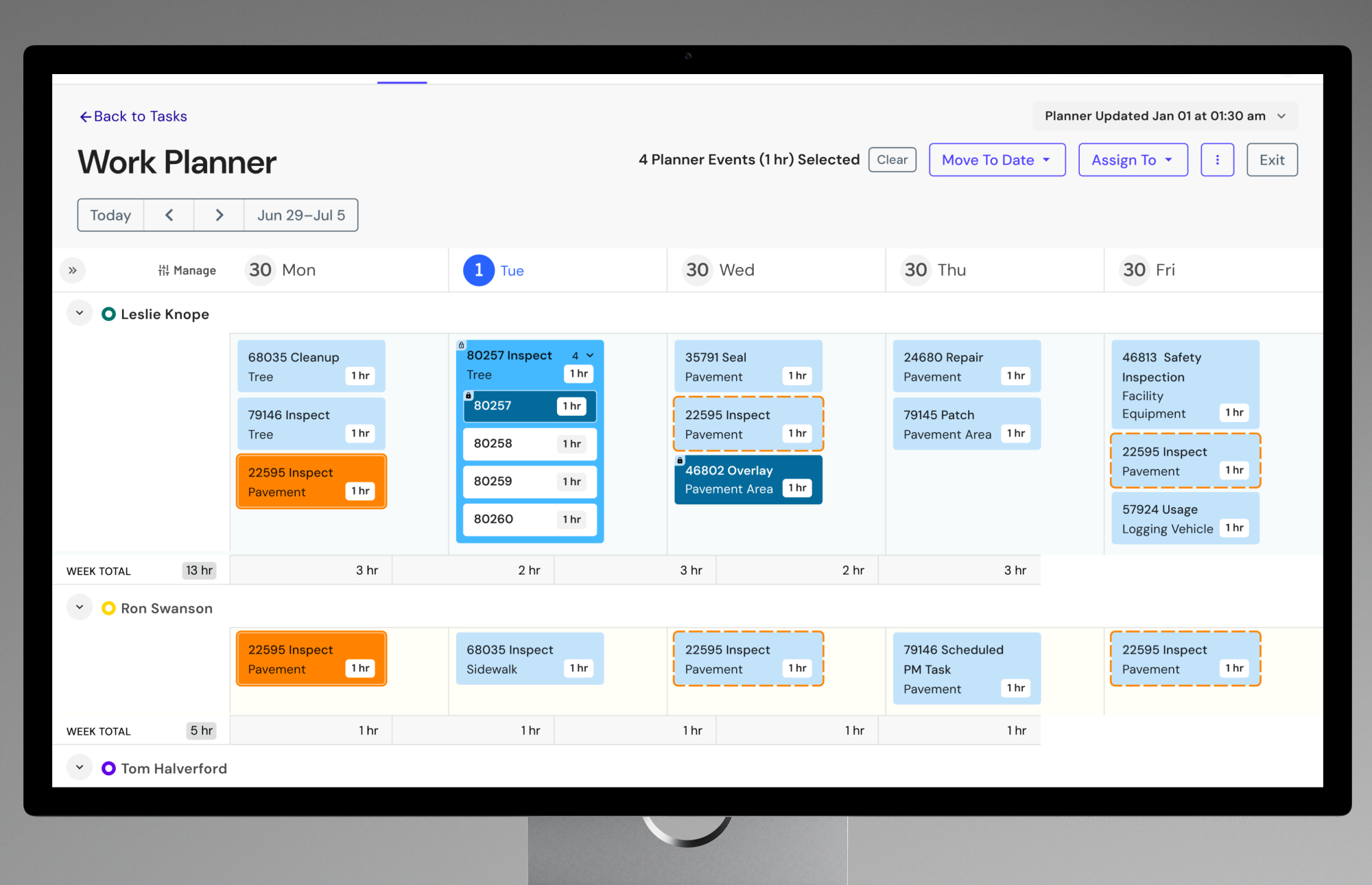
“Think less, do more.” The clearest signal from the field was that supervisors don’t want to study a screen, they want to glance and act. They also got upset with more things on the screen. So the design leans on bold, unambiguous visual states: locked work turns solid dark blue, selections bright orange. Cards stay sparse (name and ID), and the customizable grid carries whatever details each supervisor cares about. Less reading, more doing.
The whole product in one view: a whiteboard with a swim lane per person and per machine, the AI’s overnight plan, drag-and-lock control, and the linked map, grid, and calendar.
- The whiteboard. A swim lane for every person and every major piece of equipment, days in columns. A task that needs three people and a truck shows up in all four of those lanes, so a supervisor sees who and what is committed at a glance.
- The AI does the first pass but keeps a human in the loop. The AI distributes the open work across days, people, and equipment overnight, honoring skills, availability and capacity, so in the morning the supervisor walks in to a plan that’s already built. They drag to rebalance and lock what they know is right; locked cards turn dark blue and an the next run the AI leaves them alone.
- Calendar, map, and grid all linked together. The whiteboard, the Esri ArcGIS map, and the customizable grid are the same data three ways. Supervisors can finally see and edit tasks on a map, cluster nearby work to cut travel time, and drop into the grid for detail. Supervisors can select and drag from all three.
Resource / Week / Month
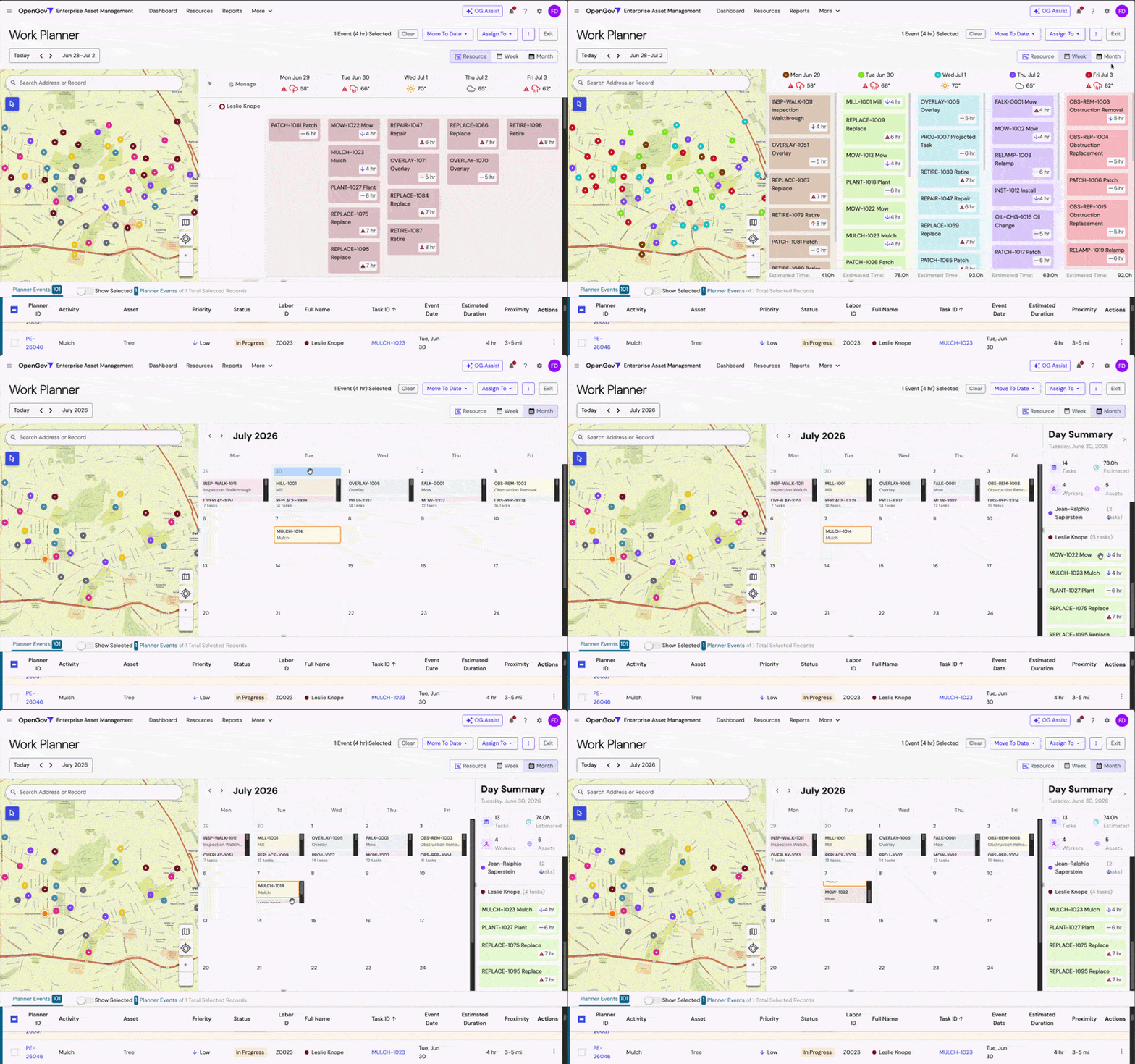
The whiteboard also has three views. “Resource” manages a person or piece of equipment individually: what task are they on today, tomorrow etc. “Week” and “Month” manage whole tasks at a glance, each card tagged with the people and equipment it needs: what projects are happening on what days. All three views work the same: drag and drop or use the menu to assign and move, or shift whole days forward when the weather turns.
Resource / Week / Month
The whiteboard also has three views. “Resource” manages a person or piece of equipment individually: what task are they on today, tomorrow etc. “Week” and “Month” manage whole tasks at a glance, each card tagged with the people and equipment it needs: what projects are happening on what days. All three views work the same: drag and drop or use the menu to assign and move, or shift whole days forward when the weather turns.
Field Worker View
The whiteboard was built for the supervisor. But once the plan locks, it has to reach someone in a truck, or in the sun, holding a phone with one hand, and that someone might be new this week.

Field crews aren’t reading dashboards. Many work outside all day, some don’t read English fluently, some don’t read much at all. Turnover is high, and most new crew members have no context for the work order system or the app itself, there isn’t time or budget to train everyone individually. So the mobile view had to answer one question fast, with zero ramp-up: where do I go and what do I do when I get there. Nothing else mattered as much.
The design leans on the same principle as the whiteboard, glance and act, and it had to be intuitive the first time someone used it. Tasks show as a short list tied to a map. One tap starts navigation to the next stop. The whole flow can be done with just a thumb. Confirming a task done is a single large tap, not a form. Touch targets are sized for someone wearing gloves.
Weather
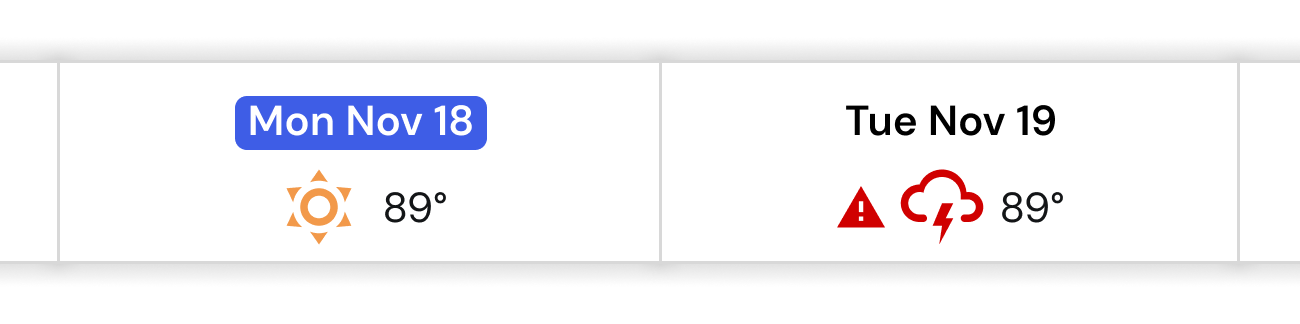
A per-day forecast right on the board. Paving and sealing need a temperature window and rain stops a lot of work, so every agency wanted weather built in. One DNR team wanted river levels too, because the water line changes what work is possible that day.
Availability
Schedule Template Builder
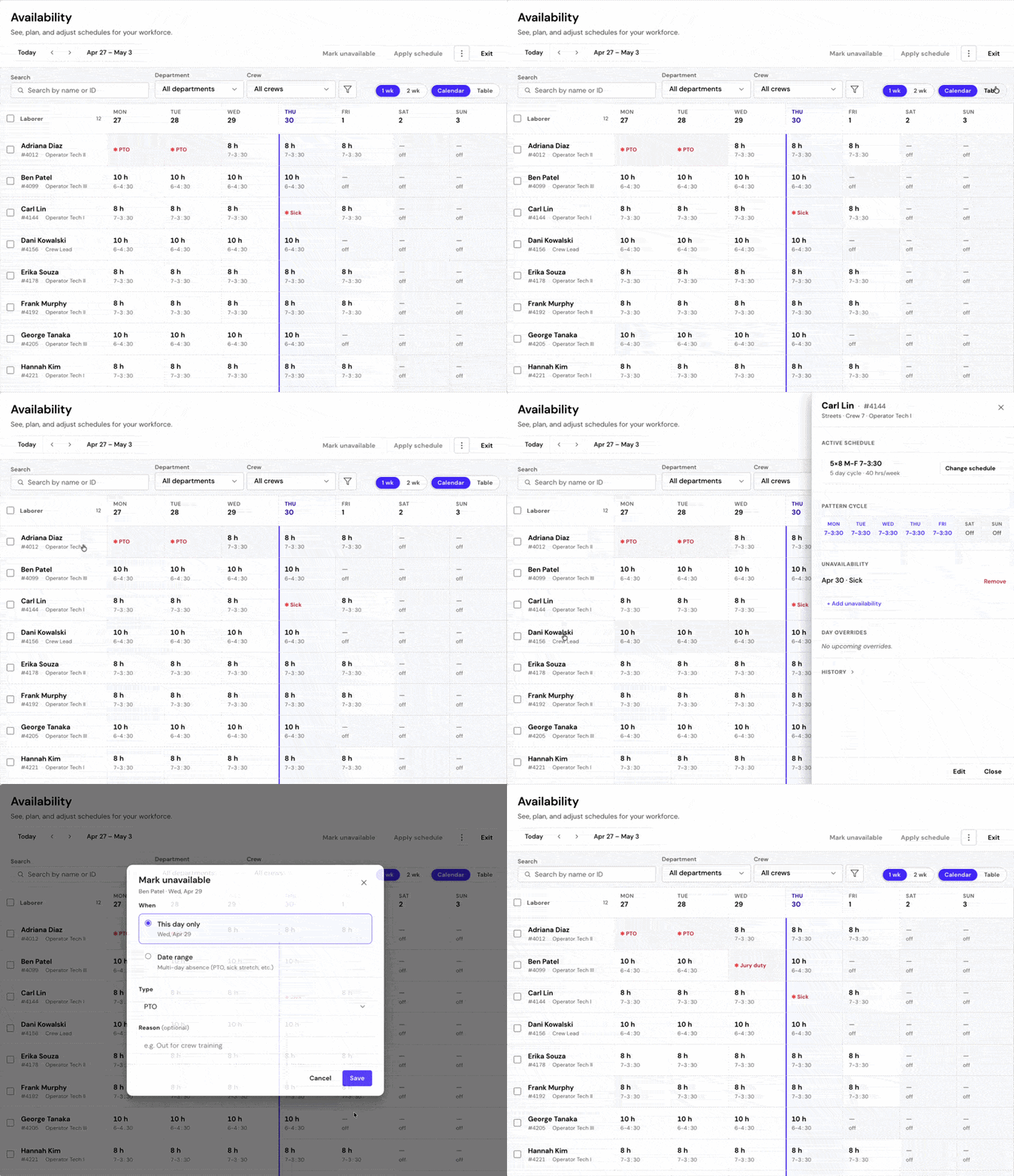
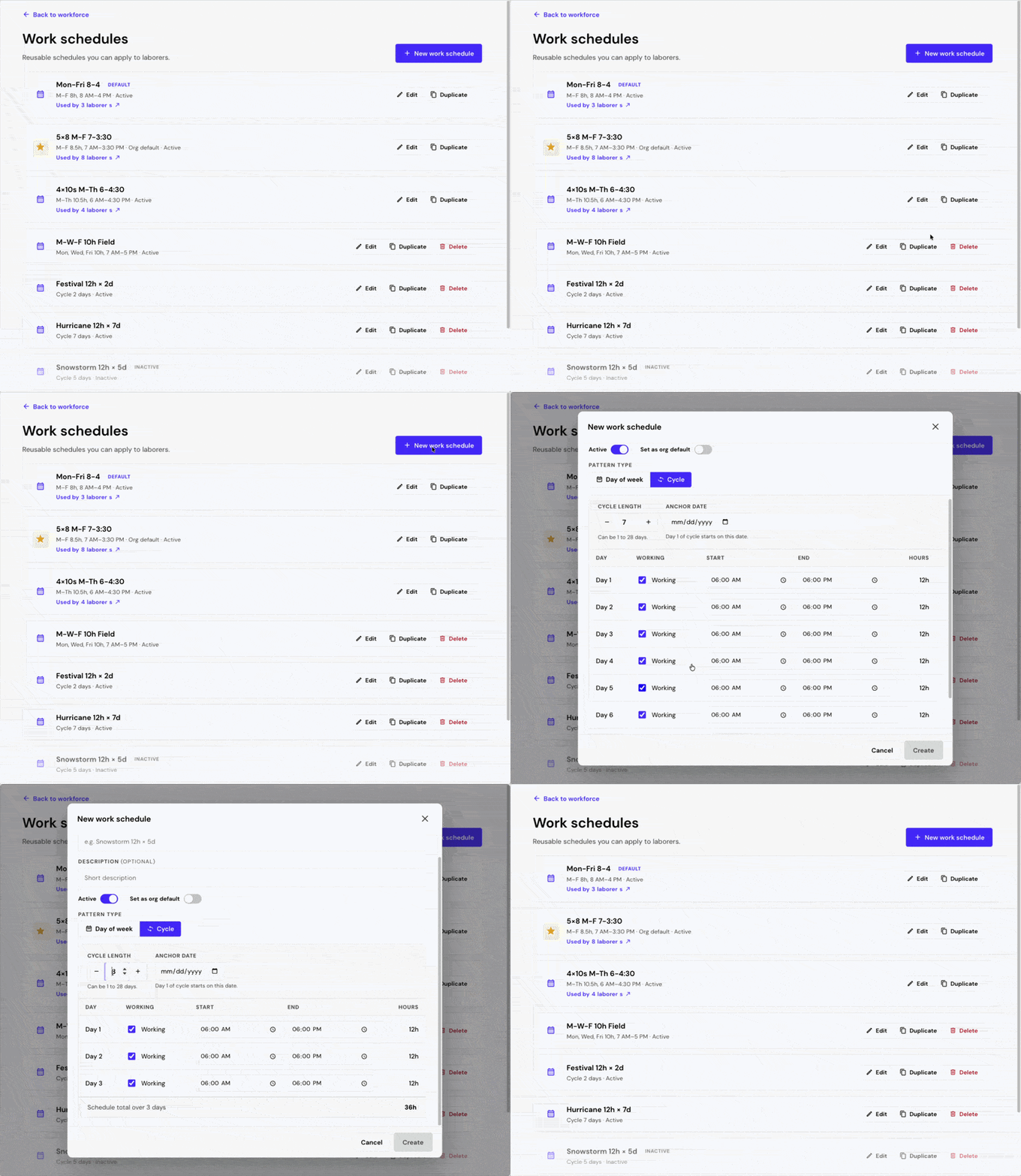
This is the template builder screen. Here you can build reusable work schedule templates for any day-cycle, not just a 5 or 7-day weeks. Crews on 4-on/3-off, or seasonal patterns get schedules that actually match how they work. Different schedules can be assigned and set to automatically change on the calendar.
Schedule Template Builder
This is the template builder screen. Here you can build reusable work schedule templates for any day-cycle, not just a 5 or 7-day weeks. Crews on 4-on/3-off, or seasonal patterns get schedules that actually match how they work. Different schedules can be assigned and set to automatically change on the calendar.
OUTCOME
The live release is visually and feature-wise leaner than the prototype, and a few ideas got compressed to make the date. The grid was meant to do the heavy lifting for the minimal event cards, v1 keeps them to name and ID, but reveals the rest on click of the ID. Rich weather indicators, map selection, and the Week/Month views are rolling out next.
In a pilot with 13 customers, Work Planner removed an estimated 80–95% of the manual scheduling work supervisors had been doing. The morning ritual that ate an hour or more became a quick review and a few tweaks.
The mobile experience brought immediate relief to users that were drinking from the firehose and only needed a sip. They were being served the whole app and everyone else’s tasks unnecessarily. Now they can be focused only to what the supervisor wants each person to see.
The sell-forward team repeatedly said it demo’d better than anything else they had. New and existing customers kept asking when they could use it. Repeatedly. Work Planner launched publicly in 2026 as part of OpenGov’s AI-native Public Service Platform.
More than the numbers, what I’m proud of is the shape of the solution: we took something genuinely complex and handed it back to people clamoring for it in a form they already understood, with AI quietly removing all the grunt work that took a serious bite out of their day.